Got this nice notification trying to install the vSphere Client 4.1 on Server 2008 R2.
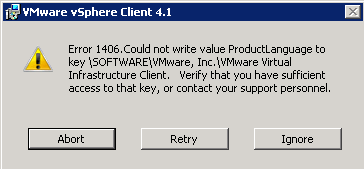
To fix this, you have to delete the following Registry key:
HKEY_LOCAL_MACHINE\SOFTWARE\Wow6432Node\VMware, Inc.
And press retry. The Sphere Client 4.1 setup will finish without errors.
ICT-Freak.nl pointed me in the right direction !
I had the same problem with a Windows 7 Pro 64-Bit system and the vSphere Client 4.1. I searched many hours in the internet for a solution. This site helped me. Thank you very much!
Very usefull, but in my case the VMware, Inc. was directly in Software.
Thank you very much.
Worked like a charm! Thanks!
I’ve got the same problem with Windows 7 and the vSphere client 5.
The solution you provided worked like a charm!
Deleting the registry key, no matter where it is located, either in Wow6432Node or directly in Software, this is the remedy.
Thank you very much.
Thanks a lot!!
Many thanks for that!
Thank you, i was the solution for me
verified to work on Server 2012 as well. Once key was removed, install completed. Thanks!
Verified to work on 2012 R2 as well. Thanks a million.
Many many thanks:)