When your servers get virtual, not all your older hardware gets reused. This was also the case with a external HP Storageworks unit. The server it was connected to used to be a normal physical server with external backup, but in the start we couldn’t get the external unit to work in vSphere.
But the solution is here !
Hardware:
– LSI 20320IE SCSI Controller (439946-001)
– HP Storageworks with a HP Storagework Ultrium 448 drive
Check you’re configuration // Storage Adapters in the vSphere client and you probably get this:
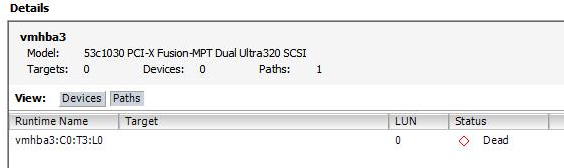
The status show ‘ Dead ‘
Now you have to connect to you’re vSphere server with SSH and execute the following command:
esxcli nmp satp deleterule --satp VMW_SATP_ALUA --claim-option tpgs_on
Go back to your vSphere client and right click on your SCSI Controller to Rescan the controller.
If you’re lucky like me it will show:
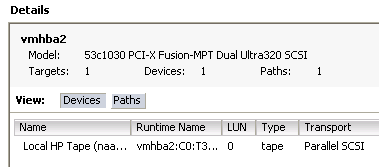
This little trick made my day!
source: VMware Communities